Home
- POV-Ray Tutorial
Loops in POV-Ray
1. For + While
Comparison
>2. Linear
Transformations
3. Circular
Transformations
4. Moebius etc.
5. Screws
& Spirals
6. Twisting
Spirals
7. Snails
& Ammonites
8. Spherical Spirals 1
9. Spherical Spirals 2
10. Fibonacci Spirals
- Download
|
Loops and Linear Transformations
|
A demonstration of some elementary
applications of the while loops in POV-Ray.
Here the while loop is used for the regular placing of objects by translations.
The following examples want to show single and nested loops.
|
Single Loop:
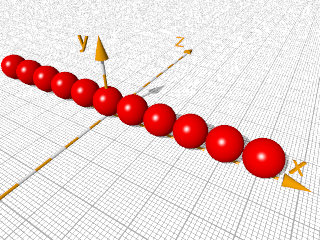
This loop puts spheres along the x axis
from X = -5 to X = +5:
#declare Ball =
 sphere{ <0,0,0>,0.5
         texture{ pigment{ color Red }
                  finish { phong 1 }
                }
        } //--------------------------
//------------------------------------
#declare X = -5;  // start
#declare End_X = 5; // end
#while ( X <= End_X )
 object{ Ball translate < X, 0.5, 0> }
#declare X = X + 1; // next
#end //-------------- end of loop ---- |

|
To avoid any collision with built-in identifiers and
reserved words in POV-Ray (all in lower case !),
it's strongly recommanded to use only words beginning
with capital letters for all identifiers of variables
declared by the user.
I.e. x = <1,0,0> is a built-in identifier,
so that is why we have to use i.e. "X" instead.
|
|
|
Nested Loop:
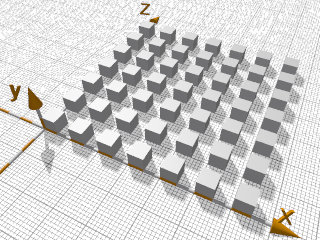
We nest an existing loop into another loop.
We get a rectangular field covered by identical objects:
#declare Boxy =
box{ <0,0,0>,< 1,1,1> scale 0.5
     texture{ pigment{ color White }
              finish { specular 0.5}}}
//------------------------------------
#declare Dx = 1.00; // distance in x
#declare Dz = 1.00;
#declare NrX = 0;      // startX
#declare EndNrX = 7;   // endX
#while (NrX < EndNrX) // <-- loop X
 #declare NrZ = 0;     // startZ
 #declare EndNrZ = 7;  // endZ
 #while (NrZ < EndNrZ) // <- loop Z
  object{ Boxy
          translate<NrX*Dx, 0, NrZ*Dz>}
 #declare NrZ = NrZ + 1;  // next NrZ
 #end // --------------- end of loop Z
#declare NrX = NrX + 1;// next NrX
#end // ------------- end of loop X |
|
|
Multiple-Nested Loop:
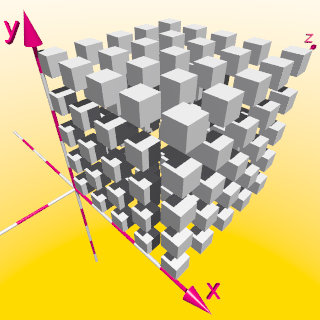
We can nest a nested loop in an additional loop.
Here we get a cube of by identically formed objects:
#declare Dx = 1.00;
#declare Dy = 1.00;
#declare Dz = 1.00;
//-------------------------------------
#declare NrX = 0;      // startX
#declare EndNrX = 5;   // endX
#while (NrX < EndNrX)
 #declare NrY = 0;     // startY
 #declare EndNrY = 5;  // endY
 #while (NrY < EndNrY)
  #declare NrZ = 0;    // startZ
  #declare EndNrZ = 5; // endZ
  #while (NrZ < EndNrZ)
   object{ Boxy
           translate
            <NrX*Dx,NrY*Dy,NrZ*Dz>
         }
  #declare NrZ = NrZ+1;// next NrZ
  #end // ---------- end of loop Z
 #declare NrY = NrY+1;// next NrY
 #end // ---------- end of loop Y
 #declare NrX = NrX+1;// next NrX
#end // ----------- end of loop X ----- |
|
|
|
With these examples our possibilities regarding to pure translations
with loops seam to be exhausted in our three dimensional world.
|
|