Home
- POV-Ray Tutorial
- Download-Seite
Systems of Coordinates
& 2D Functions
- Squared Paper
- Systems of Coordinates
with Axes
- 2D Functions
Samples
- Available Functions
in POV-Ray
|
Visualization of Mathematical Functions
in a System of Coordinates
|
Plotting of mathematical functions with POV-Ray
Objects: "plane, cylinder, cone, sphere"
Methods: "color_map, layered textures, #macro, #while"
|
For the visualization of mathematical functions we take the squared plane
with coordinate 2d axes as a background.
For getting a quadratic field of view we have to use a resolution like
[600x600, No AA, mosaic]
width="600"
height="60" 0
Antialias=Off
+SP16
+B1024
in our quickres.ini file for POV-Ray.
Alternativly we can add the line +h600 +w600
to the commandline of our POV-Ray Editor.
For plotting a funktion like "f(x) = 0.5*x + 3" we use small spheres
added together by a while loop:
union{
 #declare X   = -5.5; // start X
 #declare EndX = 5.5; // end   X
 #while ( X < EndX )

  sphere{ <0,0,0>,0.025
          pigment{ color rgb<1,0.65,0>}
          translate< X,0.5*X+3, 0>}

 #declare X = X + 0.002;  // next Nr
 #end // --------------- end of loop
} // end of union
//------------------------------------ end
Attention: Write "X" (capital letter!), not "x".
( The lowercase letter "x" is a reserved keyword abbreviation
for the vector "<1,0,0;>" ! )
POV-Ray version 3.1, 3.5, 3.6:
Write "X*X" for "x2",
or "(X-2)*(X-2)*(X-2)" for "(x-2)3".
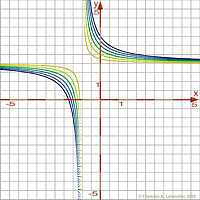
If we want to plott a function with terms in which a division by zero error
meight occur, we can prevent the loop from this error by
an #if statement, although this is not necessary because POV-Ray
is able to recognize a denominator with zero value.
Sample:
union{
 #declare X   = -5.5; // start X
 #declare EndX = 5.5; // end   X
 #while ( X < EndX )

  #if ( (X - 2 != 0) )
  sphere{ <0,0,0>,0.025
          pigment{ color rgb<1,0.65,0> }
          translate< X, 1/4*3/(X-2)-3, 0>}
  #end
 #declare X = X + 0.001;  // next Nr
#end // --------------- end of loop
} // end of union
//--------------------------------------- end |
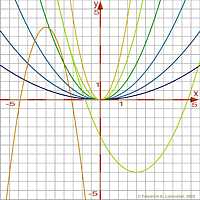
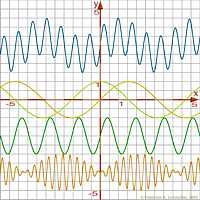
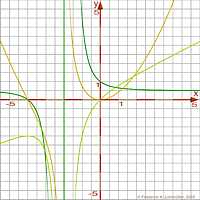
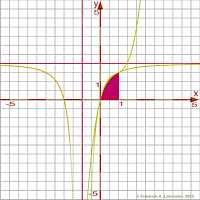
Samples of mathematical functions
Download scenery file for POV-Ray here:
sample 1,
sample 2,
sample 3
sample 4,
sample 5,
sample 6
For additional samples see section "math functions"
of my "Insert Menu Add-on".
List of some mathematical functions in POV-Ray:
abs(X) = absolute value of X.
pow(X,Y) = exponentiation: X raised to the power Y
sqrt(X) = square root of X
int(X) = integer part of X
mod(X,Y) = X modulo Y =((X/Y)-int(X/Y))*Y
div(X,Y) = integer part of (X/Y)
max(X,Y,...) = maximum of two or more float values
min(X,Y,...) = minimum of two or more float values
degrees(X) = converts radians to degrees.
radians(X) = converts degrees to radians = X*pi/180.0.
sin(X) = sine of X
cos(X) = cosine of X
tan(X) = tangent of X
sinh(X) = hyperbolic sine of X
cosh(X) = hyperbolic cosine of X
tanh(X) = hyperbolic tangent of X
asin(X) = arc-sine of X
acos(X) = arc-cosine of X
atan2(X,Y) = arc-tangent of (X/Y)
asinh(X) = invers hyperbolic sine of X
acosh(X) = inverse hyperbolic cosine of X
atanh(X) = invers hyperbolic tangent of X
exp(X) = exponential of X.
log(X) = logarithm of X
ln(X) = natural logarithm of X
|
|
Mathematical functions
Samples
Download scenery file
for POV-Ray:
Sample 1.
Download scenery file
for POV-Ray:
Sample 2.
Download scenery file
for POV-Ray:
Sample 3.
Download scenery file
for POV-Ray:
Sample 4.
Download scenery file
for POV-Ray:
Sample 5.
Download scenery file
for POV-Ray:
Sample 6.
|
|
 deutsche Version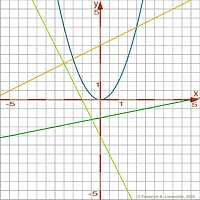
 email:
(legacy email redacted)
email:
(legacy email redacted)