Home
- POV-Ray Tutorials
POV-Ray Introduction
Content - INDEX
1. Working with POV-Ray:
"Insert Menu Add-on".
2. Basics on
How To Make a Scene.
3D Coordinates,
Floats and Vectors
>3. Scene Structure
Basic example.
4. Scene File Header,
#include files,
camera, light_source.
5. Basic Geometric Objects
sphere, box, cylinder,
cone, torus, plane.
and other shapes
6. Transformations
Streching, Turning,
Moving and others.
CSG: union,
difference, intersection.
7. Colors on Surfaces
texture, pigment, normal, finish
8. #declare, #local, #macro,
placeholders + flexible objects.
9. #while Loops
Basic examples.
10. #include, include files,
re-usable objects.
11. Efficiency,
speed, flexibility,
modulare working
adapting from 3.1 to 3.5;3.6
adapting from 3.5;3.6 to 3.7
POV-Ray + Windows Vista.
- Insert Menu Add-on
& Download
|
Scene Structure - What belongs to a Scene?
|
A description of a scene must consist of (at least) the following components:
- 0. #include Including files with predefined declarations for colors, textures, and similar things.
- 1. camera = defines camera type, standpoint and where we look at, angle of view.
- 2. light_source = defines the position and the color of the light.
- 3. Geometric objects and their properties, in details:
- Shape ("sphere, box, cylinder, cone, torus, plane" and a lot of others!)
This shape may be a basic geometric shape or e.g. combined by basic shapes with the
methods of CSG = Constructive Solid Geometry.
- Transformations = modifications of position and shape
- 'scale< , , >' - Scaling - changes of the scale
- 'rotate< , , >' - Rotations around the center of the coordinate system
- 'translate< , , >' - Translations
- Texture = description of the consistence of the surface ("texture" )
- pigment{....}: color or color pattern (must!) and transparency (optional!)
- normal {.....}: roughness (optional, if not wanted to be smooth!)
- finish {....}: brightness and brilliance of the surface (should be used!)
|
|
Basic Example of a Scenery Description File |
// POV-Ray 3.6/3.7 Scene File "Minimal.pov"
// by Friedrich A. Lohmueller, Jan-2013
//-------------------------------------------
#version 3.6; // 3.7
global_settings{assumed_gamma 1.0}
#default{ finish{ ambient 0.1 diffuse 0.9 }}
//------------------------------------------
#include "colors.inc"
#include "textures.inc"
//------------------------------------------
// camera ----------------------------------
camera{ location  <0.0 , 1.0 ,-3.0>
        look_at   <0.0 , 1.0 , 0.0>
        right x*image_width/image_height
        angle 75 }
// sun -------------------------------------
light_source{<1500,3000,-2500> color White}
// sky -------------------------------------
plane{ <0,1,0>,1 hollow
       texture{
         pigment{ bozo turbulence 0.92
           color_map{
                 [0.00 rgb<0.05,0.15,0.45>]
                 [0.50 rgb<0.05,0.15,0.45>]
                 [0.70 rgb<1,1,1>        ]
                 [0.85 rgb<0.2,0.2,0.2>  ]
                 [1.00 rgb<0.5,0.5,0.5>  ]
                       } //
           scale<1,1,1.5>*2.5
           translate<0,0,0>
           } // end of pigment
         finish {ambient 1 diffuse 0}
        } // end of texture
       scale 10000}
// fog on the ground -----------------------
fog { fog_type   2
      distance   50
      color      rgb<1,1,1>*0.8
      fog_offset 0.1
      fog_alt    1.5
      turbulence 1.8
    } //
// ground ----------------------------------
plane{ <0,1,0>, 0
       texture{
          pigment{ color rgb<0.22,0.45,0>}
          normal { bumps 0.75 scale 0.015 }
          finish { phong 0.1 }
       } // end of texture
     } // end of plane
//------------------------------------------
// objects in scene ------------------------
sphere{ <0,0,0>, 0.75
        texture{
          pigment{ color rgb<0.9,0.55,0>}
          finish { phong 1 }
        } // end of texture
        translate<0.85,1.1,0>
      } // end of sphere
//------------------------------------- end |
|
<-comments: version, titel, author, date
<- version selection
<- evtl. with gamma correction
<- default values for indirect/direct illumination
<- including of files with
predefined colors and textures
<- standpoint
<- where to look at
<- aspect ratio
<- camera angle
<- "Let there be light ... "
< Now the objects are following,
of which this world consists:
> the sky...
> the ground ...
> the groundfog ...
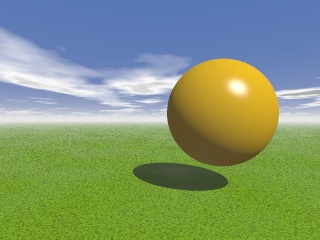
> ...and e.g. a hovering sphere
colored warm yellow
And here it is, how this world looks like:
This scene description for POV-Ray:
Minimal.pov
|
|